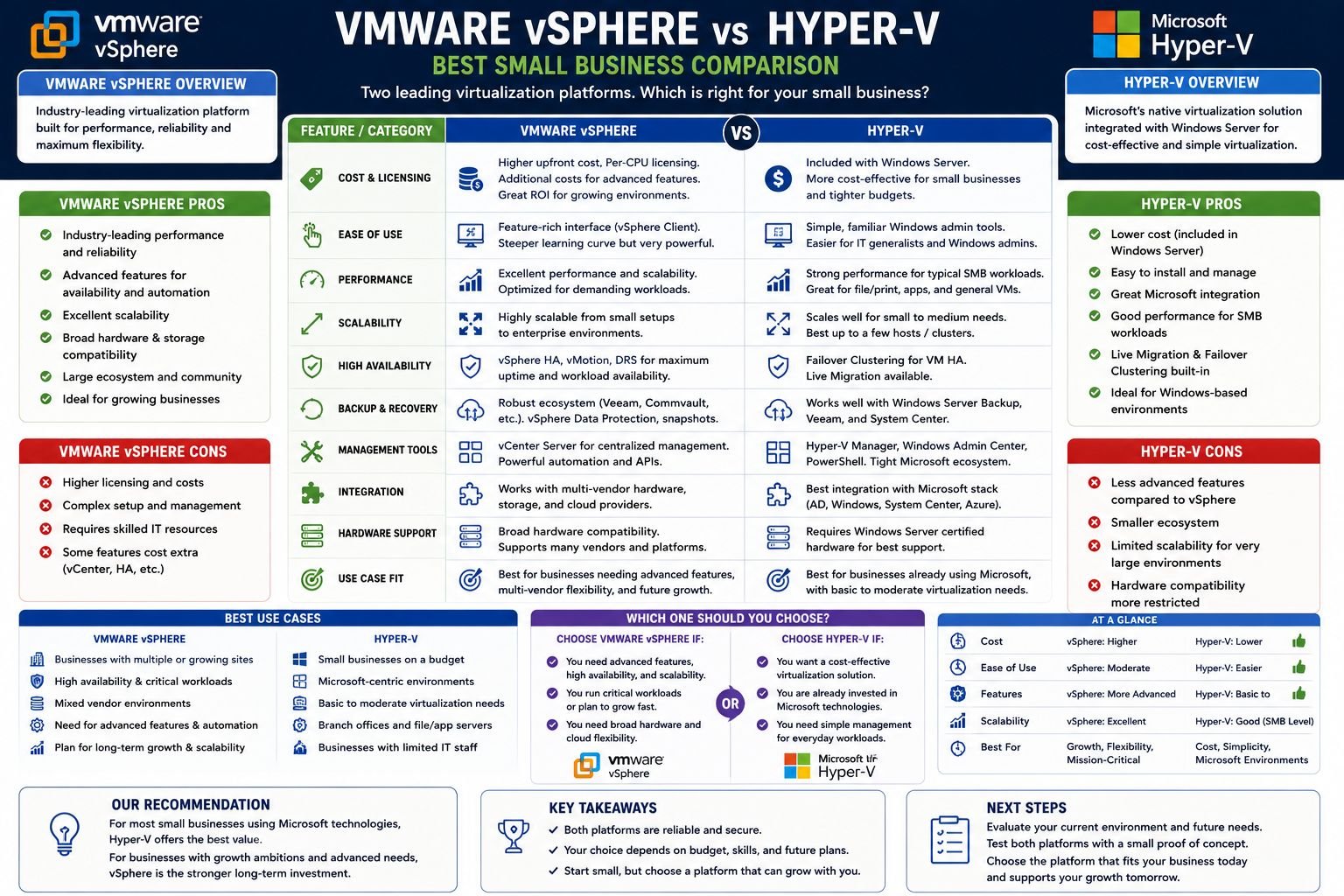
- Both VMware vSphere and Microsoft Hyper-V are enterprise-grade Type-1 hypervisors, but they serve different infrastructure needs — VMware leads in heterogeneous environments, while Hyper-V wins on cost and Microsoft integration.
- Broadcom’s 2024 acquisition of VMware dramatically changed licensing costs, making Hyper-V a more attractive option for small businesses watching their IT budgets.
- Hyper-V is included free with Windows Server licensing, while VMware vSphere requires separate licensing that can run significantly higher per CPU socket.
- Performance differences are workload-dependent — VMware leads for Linux and mixed environments, while Hyper-V excels in Windows-centric deployments.
- Keep reading to find out which platform is the smarter investment for small business infrastructure in 2025, including when running both platforms simultaneously actually makes sense.
Choosing the wrong hypervisor for your small business can cost you thousands of dollars and weeks of unnecessary IT headaches.
VMware vSphere and Microsoft Hyper-V are the two leading enterprise virtualization solutions, but small businesses have a different set of priorities. Budget constraints, lean IT teams, and tighter integration requirements make this decision more complex than most comparison guides suggest. For small businesses navigating these decisions, resources like Info2Soft offer practical technology guidance that cuts through the vendor marketing noise.
VMware vSphere vs Hyper-V: The Basics Small Businesses Should Understand
Before we delve into the nitty-gritty technical details, it’s useful to get a handle on what each platform was essentially created for. VMware vSphere was designed from scratch as a dedicated virtualization platform, with a focus on performance density and a broad ecosystem across various hardware environments. In contrast, Microsoft developed Hyper-V as a closely integrated component of the Windows Server ecosystem, making it an obvious choice for businesses that already have a lot of Microsoft infrastructure.
There is no definitive answer as to which platform is better. It all depends on what you currently have in place, the skills of your team, and most importantly for small businesses, your budget in 2025.
Each Are Type-1 Hypervisors, Yet Built for Different Objectives
A Type-1 hypervisor operates directly on the physical hardware instead of on top of an operating system, which is what makes both VMware ESXi and Hyper-V efficient and ready for production. VMware’s ESXi hypervisor is a very lightweight, purpose-built platform that eliminates everything unnecessary to prioritize raw virtualization performance. Hyper-V functions slightly differently — it installs alongside Windows Server, meaning the host OS is always present, though Microsoft has significantly refined this architecture in Windows Server 2022 to reduce overhead.
Broadcom’s 2024 Licensing Changes Increased VMware’s Cost
Broadcom’s late 2023 acquisition of VMware led to a restructuring of licensing that left the small business IT community reeling. Broadcom did away with perpetual licensing options and shifted VMware products to a subscription-only model that was bundled into broader product suites. This change greatly increased the total cost of running VMware infrastructure for small businesses that previously only paid for what they needed. Many organizations that had been comfortably running VMware vSphere Essentials found themselves priced into higher tiers with features they did not need.
Hyper-V Comes With Windows Server, VMware Doesn’t
This is one of the key differences for small businesses. Hyper-V is included for free with Windows Server 2022 Standard and Datacenter editions. If your business already has Windows Server licenses, you essentially have a fully functional enterprise hypervisor without paying any extra. Microsoft also offers Hyper-V Server as a standalone free product, although it doesn’t have some of the management features of the full Windows Server experience.
VMware vSphere comes with additional licensing costs on top of your existing infrastructure expenses. Even basic solutions like VMware vSphere Essentials Plus Kit come with substantial per-socket costs that can accumulate quickly, even across a modest three-host cluster.
If you’re a small business operating between two and four physical hosts, this licensing difference can alone amount to thousands of dollars every year. This is money that could be put towards increased storage, improved backup solutions, or employing part-time IT support.
Key Architectural Differences That Really Count
Getting to grips with how these two platforms manage computational resources, memory, and storage at an architectural level can shed light on the actual performance differences you’ll come across. These aren’t just marketing gimmicks — they have a direct effect on how effectively your VMs operate, how your storage performs under pressure, and how reliable your performance will be during times of high demand.
While both hypervisors have significantly evolved over the past ten years, their fundamentally different design philosophies still manifest in daily operations.
Comparing Resource Management: VMware ESXi and Hyper-V’s Windows-Based Approach
VMware ESXi is a bare-metal hypervisor that uses a microkernel architecture, making the entire hypervisor footprint extremely small, usually less than 200MB. This minimal footprint allows ESXi to allocate almost all physical resources directly to virtual machines. In contrast, Hyper-V uses a parent partition model where Windows Server functions as the management OS and runs alongside the hypervisor, taking up a portion of RAM and CPU that ESXi does not need. In reality, this difference can be measured, but it is rarely significant for small business workloads running on modern hardware. For businesses exploring cloud solutions, Microsoft’s cloud capabilities offer additional options worth considering.
Managing Memory: Comparing VMware’s TPS and Hyper-V’s Dynamic Memory
VMware’s Transparent Page Sharing (TPS) identifies and consolidates identical memory pages across multiple VMs, allowing more VMs to run on the same physical RAM. Hyper-V’s Dynamic Memory allows the hypervisor to increase and decrease VM memory allocations in real time based on actual demand. For small businesses running mixed workloads, Hyper-V’s Dynamic Memory often delivers predictable results and is easier to configure without needing deep memory optimization expertise.
Storage: VMFS vs Cluster Shared Volumes
VMware employs a unique file system known as VMFS (Virtual Machine File System), which is fine-tuned for virtual disk I/O and is compatible with advanced features such as Storage vMotion. Hyper-V, on the other hand, uses Cluster Shared Volumes (CSV), which is based on NTFS and ReFS and directly integrates with Windows Storage Spaces. For small businesses that already use Windows-based NAS or SAN solutions, Hyper-V’s CSV method is usually easier to set up and troubleshoot without the need for specialized storage expertise.
VMware’s VMFS does provide more detailed storage performance tuning abilities, which is important in high-density settings — but for the majority of small business deployments, the practical difference is negligible unless you are running I/O-intensive database workloads on a large scale. For businesses considering infrastructure expansion, it’s worth noting the Microsoft data center expansion as a potential resource.
Performance Comparison for Small Business Workloads
Over the past few years, the raw performance benchmarks for VMware and Hyper-V have become increasingly similar. Both platforms can deliver outstanding virtual machine performance for typical small business applications, such as file servers, email, line-of-business applications, and web services. However, there are still noticeable differences between the two platforms, depending on the type of workload.
Windows Workloads: Hyper-V’s Advantage
Hyper-V provides integration benefits that are hard to ignore for Windows Server guest VMs running applications such as Microsoft SQL Server, Microsoft Exchange, or SharePoint. Hyper-V Integration Services are deeply integrated into Windows guest operating systems, allowing optimized I/O drivers, time synchronization, and memory ballooning without additional configuration. The entire stack is optimized from top to bottom in Windows-to-Windows deployments because Microsoft controls both the hypervisor and the guest OS.
You can see these advantages in areas like how quickly a VM starts up, the latency of disk I/O, and network throughput for Windows workloads. When you test similar hardware configurations against each other, Hyper-V running Windows Server guests consistently matches or slightly outperforms VMware ESXi for pure Windows application workloads. This is largely due to these deep integration advantages.
Most small businesses with fewer than 50 employees tend to run primarily Microsoft application stacks. In such cases, where Windows VMs account for 90% or more of the environment, it’s unlikely that VMware’s performance benefits will warrant its higher price.
Linux Workloads: Why VMware Still Leads
VMware has a longer and more mature history of Linux guest OS support. ESXi’s VMware Tools package for Linux guests is more feature-complete than Hyper-V’s Linux Integration Services, particularly for older Linux distributions. For small businesses running Linux-based web servers, containerized workloads, or open-source ERP systems, VMware delivers more predictable Linux guest performance and broader distribution compatibility out of the box.
Windows Server 2019 and 2022 have significantly boosted the support for Linux on Hyper-V, and popular distributions such as Ubuntu, CentOS, and Debian perform well on Hyper-V. However, if your environment heavily relies on Linux or uses specialized distributions, the maturity of the VMware ecosystem could be a real advantage to consider against the price difference.
Costs and Licenses
When it comes to costs and licenses, the choice between VMware and Hyper-V becomes a crucial decision for small businesses. The difference in licensing costs between the two platforms is huge, and it became even larger after Broadcom’s restructuring in 2024. It’s important to know what you’re paying for and to be aware of any hidden costs before you choose a platform.
How Much VMware vSphere Will Set Back Small Businesses in 2025
Following its takeover by Broadcom, VMware has switched from standalone perpetual licenses to subscription-based bundles. The entry-level VMware vSphere Essentials Plus Kit, which used to be a one-time purchase for small businesses running up to three hosts with two processors each, is now part of a subscription model that renews annually. For small businesses that budgeted around a fixed capital expense for VMware licensing, this shift to operational expenditure fundamentally changes the financial calculus.
Small businesses often need vCenter Server for centralized management, which adds another layer of cost to the base vSphere license. Operating a fully functional VMware environment with vCenter, vSphere, and basic support entitlements can push total annual licensing spend well past what many small businesses allocated under the old perpetual model. For lean IT budgets, this is not a minor line item — it can represent a meaningful portion of the entire annual IT spend.
Hyper-V Licensing: What’s Free and What’s Not
Hyper-V comes with Windows Server 2022 Standard and Datacenter editions without any extra charges. The licensing for Windows Server 2022 Standard covers the host OS and two Windows Server virtual machine licenses per license pack. On the other hand, the Datacenter edition offers unlimited Windows Server VM licenses on the licensed host. If your small business is already using Windows Server for services like file sharing, Active Directory, etc., you won’t have to pay anything extra to add Hyper-V. The standalone Microsoft Hyper-V Server product is also available for free. However, it doesn’t have the full Windows Server GUI and you’ll need to be comfortable with PowerShell or Remote Server Administration Tools to manage it.
Unforeseen Expenses: Management Tools, Training, and Support
Both platforms have unforeseen expenses that aren’t included in the initial licensing bill. Small businesses should consider the total operational cost picture on both sides of the equation before comparing sticker prices.
Consider the following points when comparing VMware vSphere and Hyper-V for small businesses:
- VMware vCenter Server: This is a necessary component for managing clusters, live migration, and high availability. However, it is not free and requires an additional license.
- Windows Admin Center: This is Microsoft’s modern management interface for Hyper-V. It is free to download and use and covers most small business management needs.
- Third-party backup tools: Both platforms work well with Veeam Backup & Replication. However, licensing Veeam adds cost regardless of which hypervisor you choose.
- Training and certification: VMware certifications (VCP-DCV) are more complex and expensive to obtain than Microsoft’s Hyper-V-related certifications. This is important if you plan to develop internal IT skills.
- Support contracts: VMware’s Broadcom-era support contracts are structured differently than before and have drawn criticism for reduced flexibility at the SMB tier.
For a small IT team that is already juggling multiple roles, training time is a real cost. VMware’s ecosystem is broader and more complex. This means the learning curve is steeper and the time investment to become proficient is measurably higher than with Hyper-V for staff already familiar with Windows Server.
Microsoft’s commitment to free management tools, such as Windows Admin Center, has greatly reduced the usability gap that once made vCenter a standout. For most small businesses, Windows Admin Center can manage Hyper-V on a daily basis without any additional costs.
When you consider the total cost of ownership, which includes licensing, management tools, support contracts, and staff training, Hyper-V is often the more cost-effective solution for small businesses. VMware’s benefits must be significant and specific to the workload to warrant the higher price in a small to medium business setting.
Administration and Usability
For small businesses with limited IT resources, the day-to-day administration experience is crucial. A platform that needs advanced expertise to run effectively results in hidden labor expenses and a higher chance of setup mistakes. Both VMware and Hyper-V have put a lot of resources into administration tools in recent years, but there are still significant differences in the experience.
The best management environment is one that your team can use with confidence and without having to constantly refer to the manual. For most small businesses with a general IT staff, this usually means Hyper-V is the better choice.
VMware vCenter vs Windows Admin Center: Which Is Easier to Use?
VMware vCenter Server is a robust and feature-packed management platform, but its complexity reflects enterprise-level needs that most small businesses simply don’t have. Deploying and maintaining vCenter itself requires dedicated resources—it typically runs as a virtual appliance (vCSA) and requires its own compute and storage allocation. On the other hand, Windows Admin Center is a lightweight browser-based tool that can be installed in minutes and provides a clean, intuitive interface for managing Hyper-V hosts, virtual machines, storage, and networking without the operational overhead of maintaining a separate management appliance.
Automation Capabilities in Hyper-V and VMware vSphere
Both Hyper-V and VMware vSphere offer robust automation through scripting, though the tools used differ. VMware uses PowerCLI, a PowerShell-based module designed specifically for vSphere automation, which is mature and widely documented. Hyper-V is managed natively through PowerShell with the Hyper-V module built directly into Windows Server, meaning no additional tools need to be installed. For small business IT teams already comfortable with PowerShell for Windows administration, managing Hyper-V through native PowerShell commands creates a unified scripting environment that covers both the OS and the hypervisor — a genuine operational simplicity advantage over maintaining separate PowerCLI scripts alongside standard Windows automation.
Features for High Availability and Disaster Recovery
High availability and disaster recovery are not just optional considerations for small businesses. Even a few hours of downtime for a critical system can directly lead to lost revenue and damaged customer relationships. Both VMware and Hyper-V offer enterprise-grade high availability capabilities, but the complexity of implementation and licensing requirements differ in ways that matter at the SMB scale.
Both platforms offer reliable high availability for small business environments when configured correctly. The difference is in the complexity and licensing cost you have to deal with to get there.
For small businesses operating two to four physical hosts, both platforms can provide VM failover times of less than a minute in a well-structured cluster. The question is how much effort and cost it takes to construct and maintain that configuration.
VMware HA and vMotion vs Hyper-V Live Migration
VMware HA is a feature that automatically reboots virtual machines on surviving hosts when a physical host fails. vMotion, on the other hand, allows for the live migration of running VMs between hosts without any downtime. These features have been tested thoroughly and have been a core part of VMware’s value proposition for over ten years. However, both features require vCenter Server to function in a cluster context, which brings us back to the discussion of licensing costs — you cannot use vMotion without vCenter, and vCenter is not free.
Hyper-V Live Migration provides the same zero-downtime VM migration between cluster nodes, and it’s included directly in Windows Server Failover Clustering without any additional license fees. Hyper-V Replica offers asynchronous replication of VMs to a backup site or host, providing a disaster recovery capability that competes with VMware Site Recovery Manager for small business applications at no extra software cost.
- VMware vMotion: Zero-downtime live migration, requires vCenter Server license
- VMware HA: Automatic VM restart on host failure, requires vCenter and shared storage
- Hyper-V Live Migration: Zero-downtime live migration, included free with Windows Server Failover Clustering
- Hyper-V Replica: Asynchronous VM replication for DR, included free with Windows Server
- VMware Site Recovery Manager: Enterprise DR orchestration, requires separate licensing
For small businesses building their first virtualization cluster on a tight budget, Hyper-V’s inclusion of live migration and VM replication in the base Windows Server license represents a substantial value advantage that enterprise comparison guides often understate.
VMware’s HA and vMotion implementations have more features and provide more detailed control over migration policies, resource balancing, and affinity rules. This additional control is important for large enterprises that manage hundreds of VMs across dozens of hosts. For a small business managing 10 to 30 VMs across two to four hosts, Hyper-V’s built-in capabilities meet the practical requirements without the added complexity.
Backup Compatibility: Veeam, Windows Server Backup, and Other Tools
Both platforms work well with enterprise backup solutions. Veeam Backup & Replication is a popular third-party backup solution for small businesses on either platform because it supports both VMware vSphere and Microsoft Hyper-V equally well. Veeam’s agentless backup, instant VM recovery, and SureBackup verification features work consistently well on both hypervisors, so backup tool selection should not be a deciding factor between the two platforms.
Hyper-V has an edge in terms of Windows Server Backup, a feature that’s included in Windows Server for free and offers basic VM backup capability, enough for small businesses with modest recovery needs. VMware’s equivalent free backup option, VMware Data Protection, has been discontinued, meaning small businesses using vSphere have to budget for a third-party backup solution right off the bat. For businesses looking for enterprise-level backup without extra costs, Hyper-V’s built-in tools provide a significant baseline that vSphere just can’t match at the free level.
Integration with Hybrid Cloud and Azure
Even for small businesses, cloud integration is becoming more and more important, whether it’s for offsite backup, burst compute capacity, or slowly moving workloads to a managed cloud environment. The hypervisor you select now will have a direct impact on how easily you can connect to and utilize cloud infrastructure in the future, and this is where the two platforms differ significantly.
Why Azure-Connected Small Businesses Should Choose Hyper-V
For small businesses connected to Microsoft’s Azure cloud platform, Hyper-V is a clear winner due to its extensive, native integration with Azure. This integration goes beyond simple connectivity. For example, Azure Site Recovery supports direct Hyper-V replication to Azure for disaster recovery. This means a small business can replicate its on-premises VMs to Azure without the need to buy additional disaster recovery hardware or software. Azure Backup also integrates natively with Hyper-V hosts, which enables VM backup in the cloud and reduces reliance on local backup infrastructure. Additionally, Azure Arc extends Azure management capabilities to on-premises Hyper-V environments. This provides a unified management plane across on-premises and cloud resources through a single interface.
If your small business is already using Microsoft 365, Azure Active Directory, or other Microsoft cloud services, Hyper-V allows for a well-integrated and coherent technology stack from the desktop to the data center to the cloud. This integration minimizes the operational complexity of managing hybrid environments and reduces the skill threshold needed to implement cloud connectivity effectively — both of which are crucial advantages for small business IT teams that are often lean.
When is the VMware Cloud Ecosystem Worth the Expense?
The VMware cloud ecosystem, which includes VMware Cloud on AWS and VMware Cloud Foundation, is a great option for businesses that require consistent infrastructure across on-premises and multi-cloud environments. The ability to use the same VMware tools, policies, and management interfaces across on-premises ESXi hosts and cloud-based VMware infrastructure is a big plus. However, it’s priced for enterprise budgets, not those of small businesses. For small businesses considering VMware primarily for cloud connectivity, the cost may be too high to justify, especially when Azure-native Hyper-V integration can deliver similar hybrid results at a much lower cost.
Deciding Which Platform Is Best for Your Small Business
Once you’ve considered the architecture, performance, licensing, management, high availability, and cloud integration, the decision-making process becomes a bit easier. Neither platform is better than the other overall — the best choice for you depends on your particular infrastructure needs, your team’s current skill set, and where you need to see the most return on your technology investment over the next three to five years.
Hyper-V provides 90% of what VMware offers at a much lower cost for most small businesses in 2025, and the remaining 10% only matters in certain scenarios that are not common at the SMB scale. There are, however, valid reasons to choose VMware, and understanding these scenarios can help prevent a cost-driven decision that leads to technical debt in the future.
You Should Choose VMware If Your Business Is Like This
If your small business is a Linux-heavy environment with multiple distributions requiring mature guest OS support and optimized I/O drivers, then VMware vSphere is the better choice. It is also the better choice if your business operates in a regulated industry where specific VMware-certified security configurations are required for compliance. Or if you already have significant VMware expertise on staff and the cost of switching outweighs the savings from licensing. Businesses with complex heterogeneous storage environments — including Fibre Channel SANs with VMware-certified hardware — will also find the maturity of VMware’s ecosystem worth the premium. Finally, if your business provides managed IT services to clients who have already standardized on VMware infrastructure, maintaining VMware competency has clear commercial value.
Opt for Hyper-V If Your Business Has These Characteristics
Hyper-V is the better option for most small businesses, especially those that primarily run Windows Server workloads such as Active Directory, SQL Server, file services, and Microsoft application stacks. If your business already has Windows Server licenses — which is the case for most small businesses — you are essentially already paying for a fully functional enterprise hypervisor without realizing it.
For small businesses that want to use Azure for disaster recovery, backup, or gradual workload migration, Hyper-V’s integration with Azure greatly simplifies and reduces the cost of building a hybrid infrastructure. The same goes for businesses that are already using Microsoft 365 or Azure Active Directory. Hyper-V fits seamlessly into an existing Microsoft technology stack without the need for a separate vendor relationship or skill set.
For a small IT team — perhaps just one to three people who are responsible for everything from desktops to servers — the less complex management and unified PowerShell environment of Hyper-V means your team can spend less time managing infrastructure and more time supporting the business. For budget-conscious small businesses that need to justify every dollar of IT spend, the fact that Hyper-V is included for free with Windows Server is an advantage that is simply too significant to ignore.
Why a Hybrid Deployment May Be Better Than Choosing Just One
There are some small businesses that end up with mixed environments due to acquisitions, client relationships, or organic growth. Trying to enforce a single-hypervisor standard in a mixed environment can cause more problems than it solves. In these situations, it’s perfectly reasonable to run both VMware and Hyper-V at the same time, especially during a planned migration phase.
- Slow migration: You can gradually move to Hyper-V by installing it on new hardware and allowing VMware licenses to expire as their support contracts end. This approach minimizes migration risk and avoids wasting money.
- Deployment based on workload: If you only have a few Linux or legacy application VMs, you can keep them on VMware while using Hyper-V for the majority of your Windows workloads. This strategy allows you to take advantage of the strengths of both platforms.
- Managed service providers: If you’re a small MSP with clients who use both platforms, it may be beneficial to maintain proficiency in both hypervisors instead of forcing your clients to standardize too soon.
- Test and development environments: You can use Hyper-V for production Windows workloads and VMware Workstation Pro or a small ESXi host for development and QA testing. This approach keeps production costs low without limiting the flexibility of your test environment.
To make a hybrid deployment work without causing operational chaos, you need clear documentation of which workloads are on which platforms and why. You also need a defined plan for eventual consolidation. If you run two hypervisors indefinitely, you’ll have twice as much management and training to do. Therefore, hybrid deployments are most effective as a transitional strategy with a clear end goal.
Hybrid environments can be easier to manage with backup tools like Veeam Backup & Replication. This tool offers a single backup platform that can handle both VMware and Hyper-V VMs through the same console. This feature helps to reduce one of the main operational challenges of maintaining two hypervisor platforms at the same time.
The Final Say: Hyper-V Takes the Cake for Cost, VMware for Adaptability
As we look at most small businesses in 2025, Hyper-V comes out on top as the practical choice. It’s free with Windows Server, deeply tied to Azure, easier for IT generalists to manage, and fully equipped to manage the Windows-centric workloads that make up the majority of small business environments. Broadcom’s aggressive VMware licensing restructuring has sped up this shift, prompting even mid-market companies to consider Hyper-V as a primary platform instead of a secondary thought. VMware vSphere continues to be the more robust and adaptable platform for complex mixed environments, Linux-heavy workloads, and companies where the broader VMware ecosystem provides specific technical value — but for small businesses doing a genuine cost-benefit analysis, these situations are the outlier rather than the norm.
Common Questions
Small businesses that are considering VMware vSphere and Hyper-V often have a set of questions that are not answered by simple feature comparison tables. The answers provided below tackle the most common issues that hinder decision making, without the vague responses that make most vendor-related comparison guides ineffective.
Small business owners and IT managers have legitimate concerns and need clear, actionable answers. They don’t need “it depends” answers that don’t bring them any closer to making a decision.
Whether you’re considering your first virtualization platform, reevaluating an existing VMware deployment after Broadcom’s pricing changes, or trying to decide if your two-person IT team can realistically manage either platform, the answers below are intended to provide you with a solid starting point.
Can Hyper-V Replace VMware for Small Businesses?
Yes, Hyper-V is fully capable of replacing VMware vSphere for most small business use cases. Running Windows Server VMs, Active Directory, SQL Server, file and print services, and line-of-business applications on Hyper-V delivers performance and reliability that is on par with VMware in Windows-centric environments. High availability, live migration, and disaster recovery capabilities in Hyper-V — all included free with Windows Server — cover the core enterprise virtualization requirements that small businesses actually need.
VMware only truly surpasses Hyper-V as a substitute in a few situations: firms with intricate Linux workload needs, specialized VMware-certified hardware setups, or heavy reliance on the larger VMware ecosystem, including NSX-T networking or vSAN storage. Apart from these particular situations, Hyper-V is not a downgrade — it is the more fiscally prudent choice with similar operational results for small business infrastructure.
Do I Have to Purchase Windows Server to Use Hyper-V?
No. Microsoft provides Microsoft Hyper-V Server as a free standalone product that includes the Hyper-V hypervisor without the need for a full Windows Server license. It supports live migration, Hyper-V Replica, failover clustering, and remote management through Windows Admin Center or Remote Server Administration Tools. However, the standalone Hyper-V Server does not have a graphical interface on the host itself and does not include Windows Server guest VM licenses. Therefore, you will need separate licenses for any Windows VMs you run on it. For small businesses that are comfortable with PowerShell or remote GUI management and that run a combination of licensed Windows VMs and free Linux guests, the standalone Hyper-V Server is a very attractive hypervisor option that is free of cost.
How Did VMware Pricing Change After Broadcom Bought It?
When Broadcom finished buying VMware in October 2023, they started restructuring the product portfolio and licensing model right away. They got rid of perpetual licensing for all VMware products, stopped many standalone products, and combined offerings into subscription-based bundles. The main ones are VMware vSphere Foundation and VMware Cloud Foundation. The biggest change for small businesses was that VMware vSphere Essentials and Essentials Plus weren’t standalone perpetual products anymore. Before, they were the main way SMBs started using VMware.
| Aspect of Licensing | VMware Pre-Broadcom | VMware Post-Broadcom (2024+) |
|---|---|---|
| Model of License | Perpetual + yearly support | Only subscription bundles |
| Product for SMB Entry | Kit for vSphere Essentials Plus | vSphere Foundation (per core) |
| Products that Standalone | Individually available | Suites that are bundled |
| Predictability of Cost | Fixed cost of capital one-time | Subscription recurring annually |
| Impact on SMB Budget | Cost upfront moderate | Cost of OpEx ongoing higher |
With the introduction of the per-core licensing model under Broadcom, businesses with processors that have modern high-core-count — which is becoming increasingly common even in server hardware for small businesses — can see a substantial increase in licensing costs compared to the old model of per-socket. For example, a server with dual-socket that has two modern processors with 16-cores requires licensing for 32 cores instead of two sockets, which represents a cost increase that is meaningful under the new structure.
These changes have caused quite a stir in the industry. In fact, many small to mid-sized companies have sped up their migrations to Hyper-V, Proxmox, and other alternative hypervisors as a direct result of Broadcom’s pricing restructuring. For small businesses that are currently using VMware under legacy perpetual licenses, there has never been a better financial reason to migrate to Hyper-V before those contracts expire.
Which Hypervisor Is Simpler for a Small IT Team to Handle?
For small IT teams, particularly those with experience in Windows Server administration, Hyper-V is simpler to handle. Windows Admin Center offers a free, modern browser-based management interface that does not require a separately licensed and maintained management appliance, and covers everything from virtual machine lifecycle management to host monitoring, storage management, and cluster operations. The native integration with PowerShell means that IT staff who are already using PowerShell for Windows administration can use the same skills directly for Hyper-V management, without having to learn a separate toolset like VMware’s PowerCLI.
VMware vCenter is stronger and scales more elegantly for large, intricate environments, but that strength comes with operational overhead that is hard to justify for a small IT team managing a two to four host environment. Deploying, patching, and maintaining vCenter as a virtual appliance is itself a significant ongoing task. For small businesses where IT staff manage everything from endpoint support to server infrastructure, reducing management complexity is a real productivity and reliability advantage — and Hyper-V delivers that advantage clearly over vSphere at the SMB scale.
Can Small Businesses Run Both VMware and Hyper-V at the Same Time?
Technically speaking, running both VMware and Hyper-V at the same time in a small business setting is fairly easy — both platforms can coexist on the same physical network and be managed independently. The bigger question is whether the operational complexity of maintaining two hypervisor platforms is worth it given the workload needs of the business.
- Backup management: Veeam Backup & Replication supports both platforms from a single console, reducing one of the primary management complications of dual-hypervisor environments
- Staff training: Each platform requires separate skill development, certification paths, and troubleshooting knowledge — doubling the training investment for small IT teams
- Licensing overhead: Both platforms carry separate licensing obligations, support contracts, and renewal timelines that add administrative complexity
- Network and storage integration: Both hypervisors can share the same physical network infrastructure and storage arrays, though storage configuration needs to account for both VMFS and CSV requirements separately
- Migration tooling: Microsoft provides free VM migration tools, and third-party tools like Veeam and StarWind V2V Converter simplify moving VMs between the two platforms during consolidation
The most practical dual-hypervisor scenario for small businesses is a time-limited migration window where Hyper-V is being built out on new or repurposed hardware while VMware workloads are gradually migrated over. Running both platforms indefinitely creates operational overhead that erodes the cost savings of moving away from VMware licensing in the first place.
Should you find yourself in a dual-hypervisor situation due to an acquisition or inherited infrastructure, it’s best to set a migration timeline within six to twelve months of the transition. This allows your IT team to have a clear goal without pushing for a disruptive big-bang migration that could jeopardize production stability.
Ultimately, it is operationally possible to run both platforms, but it is best as a deliberate transitional strategy, not a permanent architecture. For most small businesses, the operational simplicity of standardizing on a single hypervisor — and the cost benefits of making that hypervisor Hyper-V — outweighs any short-term flexibility benefit of maintaining both platforms long-term.
When it’s time to make a solid infrastructure decision for your small business, Info2Soft is here to help. We assist organizations in navigating the maze of virtualization platform options, constructing technology foundations that provide tangible business value without any needless expenses. For instance, understanding Microsoft’s collaboration with its cloud rival can offer insights into strategic partnerships that enhance business operations.