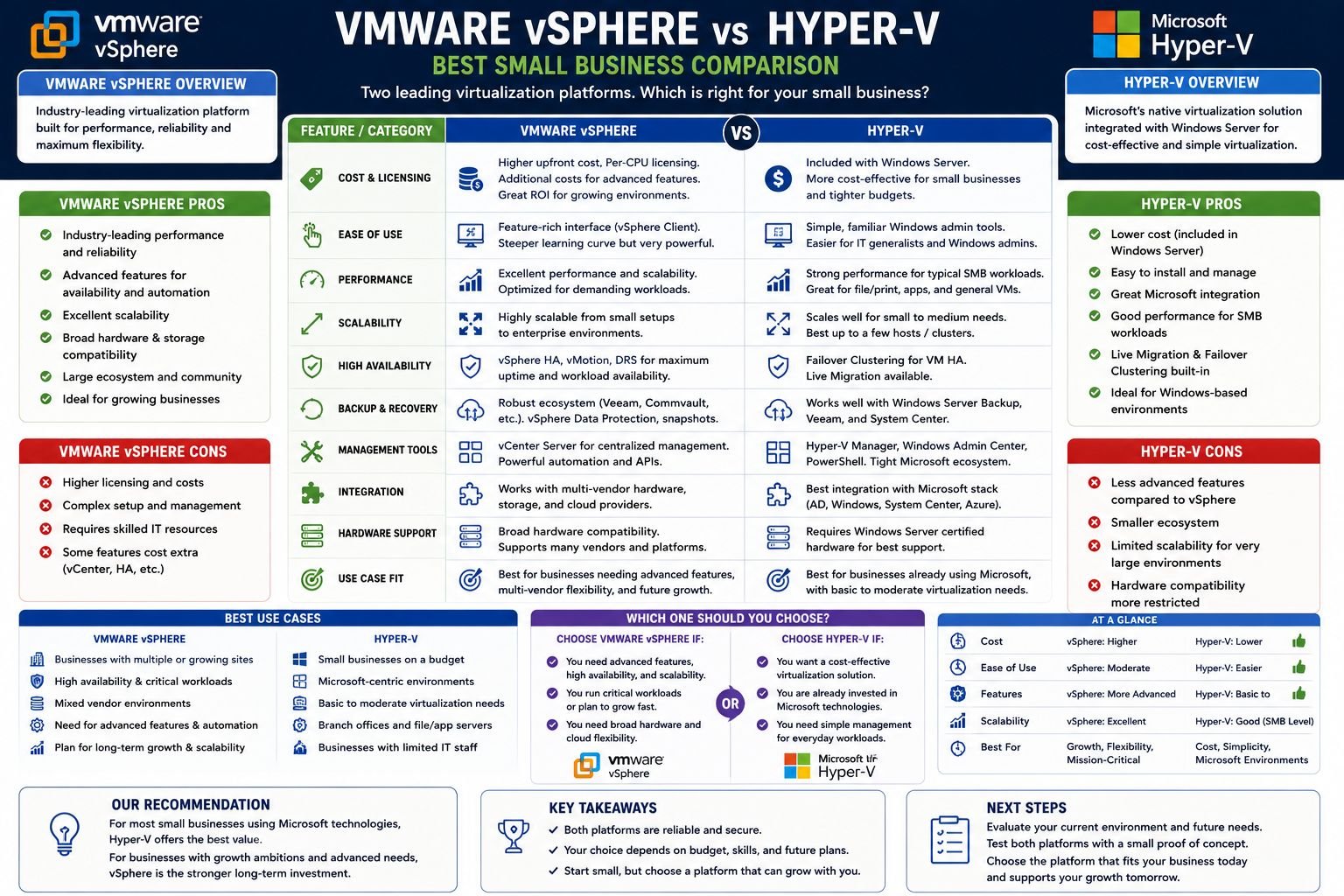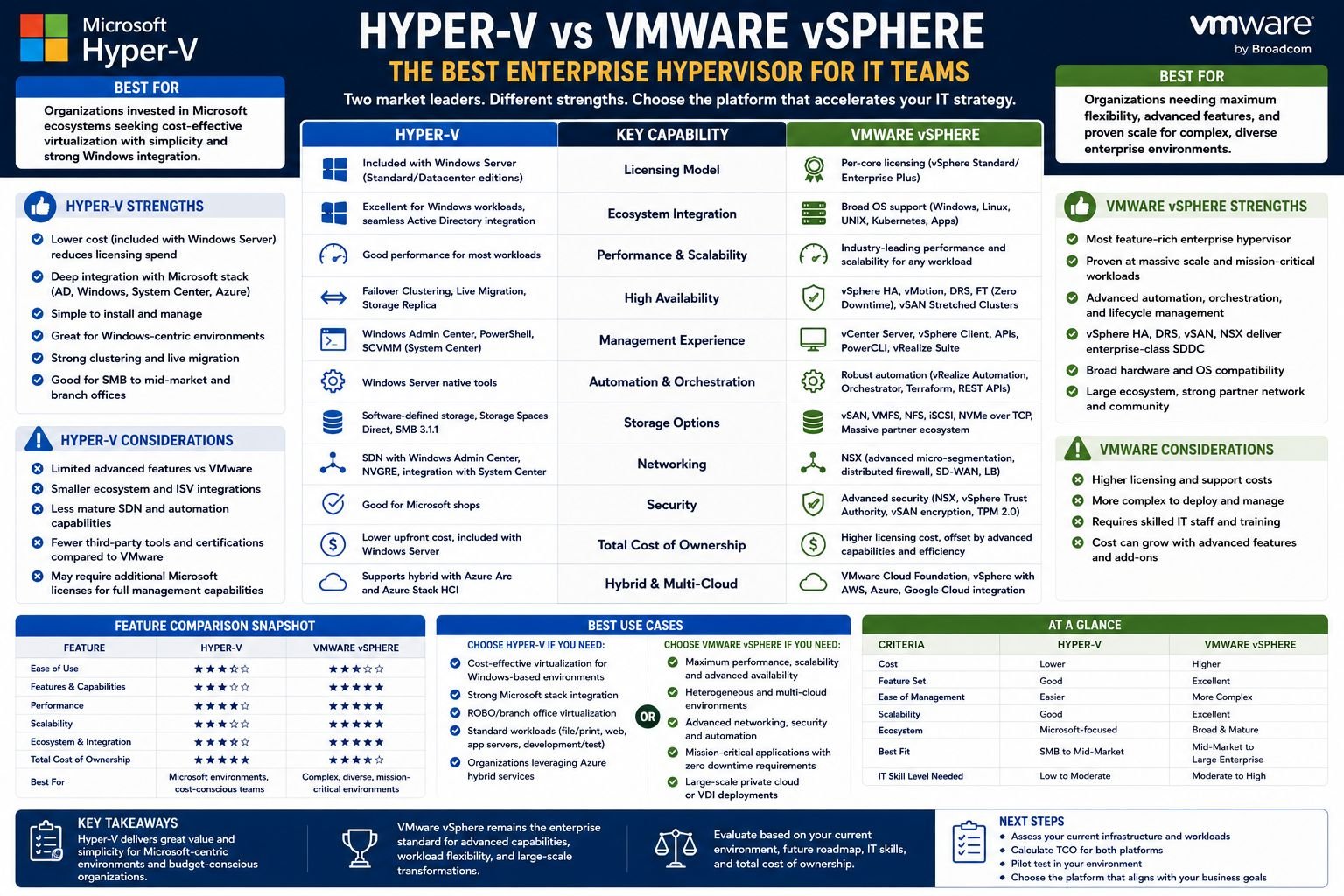
- VMware vSphere continues to be the leader in large, heterogeneous enterprise environments, but Microsoft Hyper-V has become a serious competitor — particularly for Microsoft-centric organizations looking to reduce licensing costs.
- Licensing costs changed dramatically after Broadcom’s acquisition of VMware, prompting many IT teams to reconsider Hyper-V as a cost-effective alternative that does not compromise enterprise performance.
- Hyper-V provides native Azure integration through Azure Arc, offering Microsoft-aligned organizations a hybrid cloud advantage that VMware cannot match at the same price point.
- The performance between the two platforms depends on the workload — VMware outperforms on Linux VM density and mixed workloads, while Hyper-V performs exceptionally well in Windows-only environments.
- Many enterprises are moving away from a binary decision — continue reading to learn how a hybrid Hyper-V and VMware deployment strategy is changing the way IT teams think about virtualization in 2026.
VMware Continues to Lead — But Hyper-V Is Catching Up Quickly
The decision on the hypervisor used to be straightforward — VMware was the winner, no question about it.
But that’s changed. IT teams worldwide began asking a question they hadn’t seriously considered in years after Broadcom’s acquisition of VMware rearranged licensing costs and support structures: Is Microsoft Hyper-V finally good enough to replace VMware? For many companies, the truthful answer is yes — and for some, Hyper-V was already the better option. Info2Soft, a data management and recovery expert, offers commentary on exactly this type of infrastructure decision for enterprise IT teams navigating the Hyper-V vs VMware comparison in 2026.
This piece dissects both platforms in terms of architecture, performance, licensing, management, high availability, and cloud integration — enabling your team to make a decision based on actual technical information, rather than vendor marketing.
What Defines an Enterprise-Level Hypervisor?
Not all virtualization software is created equal. Some are better suited for production environments than others. A hypervisor is considered “enterprise-level” when it can consistently support critical workloads, withstand hardware failures without downtime, scale to hundreds of virtual machines, and integrate with enterprise storage, networking, and security stacks.
Why the Type-1 vs Type-2 Hypervisor Distinction Matters for Production Workloads
When you’re dealing with a Type-1 hypervisor, it runs directly on bare metal hardware. There’s no host operating system standing between the hypervisor and the physical resources. That’s why you’ll see lower latency, better resource efficiency, and stronger isolation with Type-1 hypervisors like VMware ESXi and Microsoft Hyper-V. They’re a stark contrast to Type-2 hypervisors like VMware Workstation or Oracle VirtualBox, which run on top of a general-purpose OS. If you’re in an enterprise production environment, the only architecture you should be considering is Type-1.
What does a Hypervisor do in an Enterprise Environment?
Essentially, a hypervisor takes physical hardware — CPU, RAM, storage, and network — and allocates those resources to virtual machines on the fly. But in enterprise environments, the expectations go far beyond simply creating VMs. Both Hyper-V and VMware ESXi support:
- Seamless VM migration between physical hosts with no downtime
- Dynamic memory allocation and CPU hot-add features
- High availability clustering for automatic VM failover
- Compatibility with SAN, NAS, and software-defined storage systems
- Centralized orchestration and management on a large scale
The main difference is in how effectively they provide these capabilities, the price to access them, and the amount of operational overhead your team takes on in the process.
A Comparative Look at the Architecture of Hyper-V and VMware
While both Microsoft Hyper-V and VMware ESXi are Type-1 hypervisors, their underlying architecture is quite different. This difference has significant implications for performance, security, and manageability at scale.
VMware ESXi’s Approach to Hardware Abstraction
VMware ESXi functions as a specialized bare-metal hypervisor with a remarkably small footprint — the base installation is less than 150MB. ESXi employs its own kernel (the VMkernel) to communicate directly with hardware, entirely bypassing any general-purpose OS layer. This compact design affords VMware exceptional hardware control, especially for high-density VM deployments and workloads that require consistent low-latency storage and network I/O. VMware’s hardware compatibility list (HCL) is also one of the most comprehensive in the industry, supporting a wide array of server, storage, and networking hardware.
The Construction of Microsoft Hyper-V in the Windows Server Stack
Hyper-V uses a unique architectural strategy. When the Hyper-V role is installed on Windows Server, the hypervisor is actually positioned beneath the Windows Server OS, transforming the host OS into what Microsoft refers to as the “parent partition.” This parent partition is responsible for managing hardware drivers and hosting the Hyper-V management stack, while the guest VMs are run in child partitions. The architectural implication is clear: Hyper-V is designed to be deeply integrated with the Windows ecosystem, making it highly efficient for Windows Server workloads but adding complexity when running high-density Linux VM environments.
Which Infrastructure Offers More Management at Scale
VMware’s dedicated hypervisor infrastructure offers it a technical advantage in mixed environments where Linux, Windows, and mixed workloads are present. On the other hand, Hyper-V’s integration with Windows Server means that IT teams already managing Microsoft infrastructure face a much lower operational learning curve — and gain direct access to Windows Server licensing, Active Directory, and Azure hybrid services without additional tooling.
Performance Benchmarks: Each Platform’s Strengths
Performance isn’t just a single number — it’s influenced by the type of workload, the density of the VM, the architecture of the storage, and the configuration of the network. Both platforms can deliver impressive results when used in the right settings, but their performance profiles differ in ways that can be anticipated.
CPU and Memory Efficiency Under Heavy Workloads
VMware ESXi’s VMkernel is optimized for high VM-to-host consolidation ratios, making it particularly efficient in CPU-intensive and memory-heavy environments. VMware supports up to 768 logical CPUs per host and up to 24TB of RAM per host in vSphere 8. Hyper-V on Windows Server 2022 supports up to 512 logical processors and 48TB of RAM per host — slightly lower theoretical ceilings, though most enterprise deployments never approach either limit in practice.
Linux VM Performance: VMware has the Edge
VMware has spent years perfecting Linux guest OS optimization via VMware Tools, and it has paid off. Linux VMs on ESXi consistently show superior I/O throughput, less CPU overhead, and more reliable network performance compared to similar setups on Hyper-V. For companies that run a lot of Linux-based workloads — whether they’re application servers, containerized infrastructure, or DevOps pipelines — VMware has a noticeable performance advantage.
Performance of Windows Workloads: Hyper-V Remains Competitive
When it comes to Windows Server workloads, the performance difference between Hyper-V and VMware becomes less pronounced. Thanks to Hyper-V’s native integration with the Windows kernel, Windows guest VMs can take advantage of optimized synthetic drivers, which significantly reduce the overhead typically associated with non-native environments. For workloads native to Windows, such as Microsoft SQL Server, Active Directory, and Exchange, Hyper-V offers performance that is on par with, and in some cases matches, that of VMware vSphere.
2026 Licensing Costs: VMware vs Hyper-V
Here is where the most dramatic shift in the competitive landscape occurred. In 2023, Broadcom acquired VMware, which led to a complete overhaul of the licensing structure. This drastically changed the cost calculus for thousands of enterprise customers.
Perpetual VMware licenses were phased out by Broadcom, which switched to a subscription-only model with VMware vSphere Foundation and VMware Cloud Foundation packages. For several firms, this translated into a two to five-fold increase in their annual licensing costs, depending on their specific setup and the legacy contracts they had. The change prompted a sector-wide migration review, with many IT departments formally considering Hyper-V, Proxmox, and Nutanix as alternatives for the first time in more than ten years.
What VMware vSphere Licensing Actually Costs After the Broadcom Acquisition
Under Broadcom’s current model, VMware vSphere is licensed per core with a minimum purchase requirement. VMware vSphere Foundation is the entry point for most enterprise customers, while VMware Cloud Foundation (VCF) bundles vSphere, vSAN, NSX, and Aria together into a per-core subscription. VCF pricing has been reported by multiple enterprise customers at ranges between $50 to $200+ per core annually, depending on negotiated agreements and edition tier. For a mid-sized deployment of 10 hosts with 32 cores each, annual licensing costs can reach well into six figures before hardware, support, or management tooling is factored in. Learn more about Broadcom’s influence on the tech industry in this recent article.
Hyper-V Licensing: No Extra Cost with Windows Server
Hyper-V is bundled at no extra charge with Windows Server 2022 Standard and Datacenter editions. If your organization is already using Windows Server licenses — which is the case for most enterprises that rely on Microsoft — you are already footing the bill for Hyper-V without realizing it. Microsoft also provides Hyper-V Server as a separate free product, although it has reached the end of mainstream support and most teams now install the Hyper-V role directly via Windows Server.
Windows Server 2022 Datacenter edition licenses come with unlimited Windows Server VMs on the licensed host. This completely alters the per-VM cost calculations for organizations that run dense Windows environments. When you compare this to VMware’s per-core subscription model, the total licensing savings over a three-year period can be quite significant — especially for teams that run 50 or more VMs across a small number of hosts.
Three-Year Total Cost of Ownership
Licensing is only one part of the total cost of ownership (TCO). You also need to consider management tools, training, third-party backup and monitoring solutions, support contracts, and the operational overhead of your existing IT team. VMware’s ecosystem is mature and well-documented, but that ecosystem comes with a cost — vCenter Server, NSX for network virtualization, and vSAN for software-defined storage each have their own licensing costs on top of vSphere itself.
When it comes to a medium-sized business that operates 200 VMs across 10 hosts over a span of three years, independent infrastructure cost analyses have consistently shown that Hyper-V offers a 30% to 60% lower TCO compared to a fully licensed VMware vSphere environment. This is assuming that the organization already has existing Windows Server licensing and in-house Microsoft expertise. When VMware does have a TCO advantage, it comes from reduced management overhead in large heterogeneous environments where its automation and orchestration capabilities justify the premium.
Management Experience: vCenter vs Windows Admin Center
Many IT teams make their final platform decision based on the day-to-day management experience. This is because the team that deploys the hypervisor will also have to use it for the next five to seven years.
VMware vCenter: Strong but Intricate
VMware vCenter Server is the main management platform for vSphere environments and is truly one of the most powerful infrastructure management tools on the market. From a single vCenter interface, administrators can manage host clusters, deploy VMs on a large scale, configure distributed virtual switches, set resource pools, monitor performance across the entire estate, and trigger automated responses to infrastructure events. The level of control is outstanding.
The downside is that vCenter is complicated. It’s not easy to learn, and it takes a lot of time and training to get the hang of all its features — distributed resource scheduling, content libraries, lifecycle management, NSX integration. Plus, vCenter needs its own dedicated virtual appliance (the vCenter Server Appliance, or VCSA), which has its own resource requirements. That means you’re adding to your infrastructure overhead before you’ve even deployed a single workload VM.
Windows Admin Center and SCVMM: Simpler for Microsoft Shops
Microsoft offers two primary management paths for Hyper-V environments. Windows Admin Center (WAC) is a browser-based, lightweight management tool that handles host management, VM deployment, storage configuration, and basic cluster management — and it is free. For larger, more complex Hyper-V deployments, System Center Virtual Machine Manager (SCVMM) provides enterprise-scale orchestration, multi-host management, VM template libraries, and integration with System Center Operations Manager for monitoring. SCVMM requires a System Center license, but for organizations already in the Microsoft System Center ecosystem, this is often already covered. Additionally, recent Microsoft data center expansion efforts highlight the growing infrastructure supporting these management tools.
Comparing Automation and PowerShell on Both Platforms
Both platforms have robust automation capabilities, but their methods vary. VMware offers PowerCLI, a PowerShell-based module with over 700 cmdlets that covers almost every vSphere operation. VMware also supports REST APIs through the vSphere Automation API, which allows for infrastructure-as-code workflows with Terraform, Ansible, and custom scripting. For organizations that have already established VMware automation pipelines, these tools are mature and well-documented.
Hyper-V automation operates directly through PowerShell Direct and the Hyper-V module, both of which come standard with Windows Server. For IT teams that are already proficient in PowerShell — which is the case for most Microsoft shops — there is no need for additional tools or learning curves when it comes to Hyper-V automation. The Hyper-V PowerShell module covers everything from VM lifecycle management and virtual switch configuration to checkpoint management and replication. This makes it easy to create fully automated deployment pipelines without having to rely on third-party dependencies.
Integration with Third-Party Tools: Ansible, Puppet, and More
VMware has a definite edge when it comes to the maturity of its third-party ecosystem. Almost every enterprise infrastructure tool, including Veeam and Zerto for backup and replication, Ansible and Puppet for configuration management, and Datadog and SolarWinds for monitoring, has deep VMware integration that has been purpose-built over more than 20 years. When you choose VMware, you are investing in one of the most extensively supported infrastructure ecosystems on the market.
Although the third-party ecosystem for Hyper-V has seen significant improvements, it still falls short when compared to VMware in terms of the breadth and depth of integrations. Veeam Backup & Replication provides comprehensive support for Hyper-V, and Ansible also has robust Hyper-V modules. However, some specialized enterprise tools still treat Hyper-V as a secondary platform. Therefore, if your organization uses specialized infrastructure tools, it would be prudent to audit your existing tool stack for Hyper-V compatibility before deciding to migrate.
High Availability and Disaster Recovery Capabilities
In enterprise environments, high availability is not optional — it is a baseline requirement. Both platforms deliver HA capabilities, but the implementation details matter significantly when you are designing for near-zero RTO and RPO.
VMware vSphere HA and vMotion: The Gold Standard for Enterprise
When a host fails, VMware vSphere HA will automatically restart VMs on the surviving hosts within a cluster, typically within minutes, depending on the configuration of the restart priority. However, the real standout is vMotion, VMware’s live migration technology, which moves running VMs between hosts with no downtime and no noticeable impact on performance. vMotion has been in production since vSphere 4 and is one of the most tried-and-tested live migration implementations in enterprise infrastructure.
VMware also provides Fault Tolerance (FT), which develops a live shadow VM that copies the primary VM in real time — offering no data loss and no downtime for supported workloads, at the cost of significant resource overhead. For tier-0 workloads where even a few minutes of downtime is not tolerable, VMware FT is unparalleled in the industry.
Hyper-V Failover Clustering and Live Migration
Hyper-V offers high availability through Windows Server Failover Clustering (WSFC). This feature allows for automatic VM failover in the event of a cluster node failure. With Hyper-V’s Live Migration, running VMs can be moved between cluster nodes without any downtime. Hyper-V Replica provides asynchronous VM replication to a secondary site for disaster recovery. Replication intervals can be as low as 30 seconds in Windows Server 2012 R2 and later versions.
Hyper-V’s HA capabilities are more than enough for most enterprise workloads. The Failover Cluster Manager gives a clear view of cluster health, and Live Migration works well in Windows-centric environments. The difference between Hyper-V and VMware is most noticeable in very large cluster configurations and in the detail of HA policy controls. VMware vSphere HA provides more detailed per-VM restart priority settings and admission control policies than WSFC by default.
- Hyper-V Replica supports replication to on-premises secondary sites and Azure for disaster recovery
- Live Migration supports concurrent migrations with bandwidth throttling controls
- Storage Live Migration moves VM storage between locations while the VM remains running
- Cluster-Aware Updating (CAU) automates host patching with automatic VM evacuation and failover
For most mid-market enterprises and Microsoft-aligned organizations, Hyper-V’s HA feature set covers the vast majority of recovery scenarios without the complexity or cost of VMware’s full HA stack.
Integrating Hybrid Cloud and Azure
Cloud integration is now a key factor in hypervisor selection. This isn’t because companies are moving away from on-premises infrastructure, but because hybrid architectures that incorporate both on-premises and cloud have become the operational norm for most organizations. For example, Microsoft is leveraging its cloud capabilities to address capacity issues, highlighting the importance of hybrid solutions.
Hyper-V and Azure Arc: A Native Integration VMware Can’t Compete With
Hyper-V’s biggest edge in 2026 is its native integration with Microsoft Azure. Azure Arc extends Azure management, policy, and security services to on-premises Hyper-V infrastructure without the need to move workloads to the cloud. IT teams can manage Hyper-V VMs through the Azure portal, apply Azure Policy for governance, use Microsoft Defender for Cloud for security posture management, and run Azure services like Azure Monitor and Azure Update Manager directly on on-premises VMs.
For businesses that already have Azure commitments – which is the majority of enterprise Microsoft stores – this integration removes a large chunk of tooling cost and operational complexity. There is no equivalent native integration path for VMware. Azure VMware Solution does exist, but it’s a different product with a different pricing model, and it doesn’t provide the same unified management experience that Hyper-V natively delivers through Arc.
VMware Cloud on Azure: High-Powered but High-Priced
With Azure VMware Solution (AVS), companies can operate VMware vSphere workloads directly on Azure dedicated hardware, using the familiar VMware tools and APIs. This is a real boon for businesses that want to lift-and-shift VMware workloads to Azure without having to redesign VMs or retrain staff. The operational consistency between on-premises vSphere and AVS is a major plus for large businesses with deeply ingrained VMware operational processes.
However, the price is substantial. AVS is priced per dedicated host node on Azure, with each node running at several thousand dollars per month depending on the node type and reservation term. For a production environment requiring a minimum of three nodes, the monthly commitment starts at a level that makes it one of the more expensive cloud migration paths available. Most organizations use AVS as a transitional strategy rather than a long-term destination. In fact, Microsoft is resorting to its biggest cloud rival to deal with GitHub AI capacity issues, highlighting the competitive nature of cloud services.
When considering the hybrid cloud capabilities of these two platforms, it’s important to consider where your organization has invested its cloud resources. If your enterprise is aligned with Azure, you’ll find that Hyper-V and Azure Arc provide a native, cost-effective hybrid solution. On the other hand, if your organization is primarily using AWS or a multi-cloud solution, you may find that VMware’s extensive cloud partner ecosystem — which includes AWS, Google Cloud, and Azure — offers more operational flexibility.
| Hybrid Cloud Scenario | Best Platform | Reason |
|---|---|---|
| Azure-first hybrid strategy | Hyper-V | Native Azure Arc integration, no extra licensing cost |
| Lift-and-shift VMware to cloud | VMware (AVS) | Operational consistency, no need for VM re-architecture |
| Multi-cloud management | VMware | Wider cloud provider partnerships across AWS, GCP, Azure |
| On-premises DR to Azure | Hyper-V | Azure Site Recovery integrates natively with Hyper-V Replica |
| Unified governance across cloud and on-prem | Hyper-V | Azure Policy and Defender for Cloud apply natively via Arc |
Which Platform is Better Suited for a Hybrid Cloud Strategy
If your organization primarily uses Azure and Microsoft 365, Hyper-V offers a hybrid cloud experience that VMware simply cannot match at the same cost. The combination of Hyper-V, Azure Arc, Azure Site Recovery, and Azure Monitor provides a unified operational plane that spans on-premises and cloud without the need for separate management tools or additional licensing.
VMware’s hybrid cloud story is most compelling for large enterprises already running vSphere at scale who want to extend to multiple cloud providers without changing their operational model. For those organizations, the investment in VMware infrastructure pays dividends in cloud portability — but it comes at a cost that is increasingly difficult to justify as Hyper-V and Azure close the capability gap.
Security Features of Both Platforms
Security is now a priority in choosing a hypervisor, not just an afterthought. VMware and Hyper-V have both invested a lot in security features at the platform level. However, they have different approaches to security, which reflect their overall architectural philosophies.
VMware is the leader in network-level security and workload isolation at scale, but Hyper-V has a strong suit in its deep integration with the Windows security stack and hardware-rooted trust. It’s important to understand which approach is best suited to your threat model before you commit to either platform.
VMware vSphere Security: NSX Micro-Segmentation and Encrypted vMotion
VMware’s most powerful security capability is NSX micro-segmentation, which enforces granular network security policies at the individual VM network interface level — completely independent of the physical network topology. Rather than relying on perimeter firewalls to protect east-west traffic between VMs, NSX applies distributed firewall rules directly at each VM’s virtual NIC. This means that even if an attacker compromises one VM inside your data center, lateral movement to adjacent VMs is blocked by policy at the hypervisor layer — not by a network device that may have already been bypassed.
VMware vSphere also includes Encrypted vMotion, which encrypts all live migration traffic between hosts so that VM memory contents cannot be intercepted during migration. VM Encryption at the vSphere layer encrypts VM files at rest — including VMDK, snapshot, and swap files — using keys managed through a Key Management Server (KMS) that integrates with enterprise KMS solutions. For regulated industries handling PII, PHI, or financial data, these encryption capabilities are often compliance requirements, not optional enhancements.
Hyper-V’s Shielded VMs and Windows Defender Integration
Hyper-V’s main security feature is Shielded VMs, which was first introduced in Windows Server 2016. A Shielded VM uses BitLocker to encrypt the VM’s virtual disk, ties the VM to a trusted host via the Host Guardian Service (HGS), and stops unauthorized access to the VM — even by hypervisor administrators on the host. This feature is especially important in multi-tenant or managed service provider settings where VM owners need to protect against infrastructure administrators who have physical access to the host.
Hyper-V Security Feature Summary
Shielded VMs: VM disks encrypted with BitLocker and tied to trusted hosts via Host Guardian Service (HGS) — this shields VM data even from hypervisor admins.
Virtual TPM (vTPM): Provides a virtual Trusted Platform Module to guest VMs, enabling BitLocker inside the VM and supporting Windows 11 guest requirements.
Secure Boot for VMs: Stops unauthorized bootloaders or OS kernels from loading inside guest VMs — available for both Windows and Linux guests.
Microsoft Defender for Cloud Integration: Through Azure Arc, Hyper-V hosts and VMs can be monitored by Defender for Cloud for security posture scoring, vulnerability assessment, and threat detection.
Windows Defender Application Control (WDAC): Can be applied to Hyper-V hosts to limit which binaries and drivers can execute at the host level, reducing the attack surface of the hypervisor itself.
Hyper-V also offers virtual TPM (vTPM) support, which provides a virtual Trusted Platform Module to guest VMs. This enables BitLocker encryption inside the guest OS, supports Windows 11 VM requirements, and allows applications within the VM to use TPM-backed key storage — a feature that is increasingly required for modern enterprise security baselines.
For businesses that are already using Microsoft Defender across their servers and endpoints, the integration between Hyper-V and Microsoft Defender for Cloud via Azure Arc provides a unified security management view that covers on-premises VMs and cloud workloads from a single dashboard — without the need to deploy additional security agents or management infrastructure.
Which Platform is the Best Choice for Your IT Team in 2026?
The truth is that the choice between these two platforms isn’t about which one is technically better. Instead, it’s about which one best suits the operational needs of your particular environment. Both VMware and Hyper-V are hypervisors that are ready for production and capable of handling enterprise needs. The most significant differences between them are their cost structures, the investments you’ve already made in infrastructure, the mix of workloads they’ll be handling, and your long-term cloud strategy.
Opt for VMware If Your Infrastructure Resembles the Following
VMware vSphere continues to be the superior option when your environment incorporates a significant number of Linux workloads in addition to Windows, when you need the most established third-party ecosystem for backup, monitoring, and security tools, or when you operate on a scale where VMware’s sophisticated automation and DRS features significantly decrease operational costs. It’s also the best option if your team has extensive VMware knowledge that would be costly to retrain, or if your cloud strategy involves multiple providers — AWS, GCP, and Azure — where VMware’s wider cloud partner ecosystem provides operational uniformity across platforms.
Hyper-V is the Best Choice for These Types of Infrastructures
Hyper-V is the most compelling choice for organizations that primarily run Windows Server workloads. This is because existing Windows Server Datacenter licenses already cover the hypervisor, so there’s no additional cost. If your organization is primarily using Azure as your cloud platform and you have existing Azure commitments, the native integration between Hyper-V, Azure Arc, and Azure Site Recovery creates a unified hybrid operations model. VMware can’t match this without adding a significant additional cost.
Hyper-V is also a good choice for mid-sized businesses where the budget for licensing is a major concern, where the IT team is already skilled in PowerShell and the Microsoft ecosystem, and where the VM density and complexity of the workload do not necessitate VMware’s most sophisticated enterprise features. If your estate is primarily SQL Server, Active Directory, Exchange, or other Microsoft workloads, Hyper-V will perform just as well as VMware but at a much lower licensing cost.
When a Hybrid VMware and Hyper-V Deployment is the Most Beneficial
More and more large enterprises are not deciding between Hyper-V and VMware, they are running both, on purpose. A hybrid deployment strategy sets up VMware for the workloads that really need its advanced capabilities, such as high-density Linux environments, complex DRS-managed clusters, or workloads requiring VMware FT, while consolidating Windows-native workloads onto Hyper-V to cut down on per-VM licensing costs. This approach requires more operational discipline and tooling investment to manage two hypervisor platforms, but for large enterprises with diverse workload portfolios, it can provide both the performance of VMware where it is important and the cost efficiency of Hyper-V where it is not.
The Verdict: Both Hyper-V and VMware are Winners — Depending on the Scenario
VMware vSphere continues to be the most feature-rich enterprise hypervisor available on the market — however, the acquisition by Broadcom has fundamentally shifted its value proposition for a large segment of the enterprise market. Hyper-V in 2026 is not the bare-bones alternative it was ten years ago. It has evolved into a mature, enterprise-ready platform that offers remarkable value for organizations that are Microsoft-centric, strategies that are aligned with Azure hybrid, and any environment where Windows workloads make up the majority of the VM estate. The decision that your IT team makes today should be informed by a thorough analysis of workload requirements, licensing costs, cloud strategy, and operational expertise — not just by the reputation of the platform.
Commonly Asked Questions
Is Hyper-V truly free compared to VMware?
Hyper-V is included at no extra charge with Windows Server 2022 Standard and Datacenter editions. If your organization already has Windows Server licenses — which is the case for most enterprise Microsoft shops — you are effectively running Hyper-V at no additional licensing cost. Microsoft previously offered Hyper-V Server as a totally free standalone product, though most current deployments use the Hyper-V role within Windows Server.
It’s important to note that “free hypervisor” doesn’t necessarily mean there are no costs involved. For larger environments, System Center Virtual Machine Manager (SCVMM) adds management capabilities but requires a System Center license. Backup, monitoring, and disaster recovery tools also come with their own costs. However, even when you factor in the cost of management tools, the total licensing cost of a Hyper-V environment is consistently and significantly lower than a comparable VMware vSphere deployment. This is especially true after Broadcom’s pricing changes in 2023 and 2024.
Is Hyper-V as capable as VMware vSphere for enterprise workloads?
Yes, for the most part, Hyper-V can handle the same production workloads as VMware vSphere with the same reliability and performance. This includes Windows Server applications, SQL Server databases, Active Directory, file and print services, and most line-of-business applications. Hyper-V also meets most of the core enterprise resiliency requirements that organizations need, such as high availability through Windows Server Failover Clustering, live migration, and Hyper-V Replica.
VMware maintains a true performance and capability advantage in high-density Linux VM environments, workloads requiring VMware Fault Tolerance for zero-downtime protection, and very large heterogeneous cluster configurations. In these scenarios, VMware’s Distributed Resource Scheduler (DRS) provides automation value that Hyper-V has yet to fully match. However, for businesses that primarily use Windows, these gaps are rarely relevant to daily operations.
How did VMware pricing change after the Broadcom acquisition?
In late 2023, Broadcom took over VMware and immediately stopped offering VMware’s perpetual licenses. They also removed most standalone product SKUs and shifted the entire portfolio to subscription-based bundles, primarily VMware vSphere Foundation and VMware Cloud Foundation. Existing perpetual license customers lost their previous support agreements and had to switch to subscription licensing when they renewed. Many enterprise customers publicly reported that their costs increased 2x to 5x their previous annual VMware spend. This led to a significant number of hypervisor migration assessments across the industry in 2024 and 2025.
Is it possible to run both Hyper-V and VMware in the same enterprise environment?
Yes, it is possible and many large enterprises are already doing it. To run both hypervisors at the same time, you need to clearly segment your workloads, have separate management tools for each platform, and have a team that is knowledgeable in both environments. The operational overhead is a reality, but for organizations with diverse workload portfolios, a hybrid strategy allows VMware to serve the workloads that truly benefit from its advanced capabilities, while Hyper-V handles the Windows-native workload estate at a significantly lower licensing cost. Backup and monitoring tools like Veeam Backup & Replication support both platforms natively, which simplifies the data protection layer in hybrid deployments.
Which hypervisor is the best for Azure hybrid cloud integration?
Hyper-V is the clear winner for Azure hybrid cloud integration. Microsoft created Azure Arc to extend Azure management, policy, governance, and security services natively to Hyper-V infrastructure — without the need for additional hypervisor licensing. Azure Site Recovery works directly with Hyper-V Replica for cloud-based disaster recovery, and Azure Monitor, Microsoft Defender for Cloud, and Azure Update Manager all apply natively to Hyper-V hosts and VMs managed through Arc.
VMware has Azure VMware Solution (AVS), a way to run vSphere workloads on Azure’s dedicated hardware. This provides a lot of operational consistency for organizations that are heavily invested in VMware and are moving workloads to the cloud. But AVS is expensive, so for most organizations, it’s a tool to help them transition, not a long-term hybrid platform. For more insights on cloud strategies, you can read about how Microsoft is leveraging its biggest cloud rival to address capacity issues.
For those organizations that are committed to Azure — meaning Azure is their primary or exclusive cloud platform — the combination of Hyper-V and Azure Arc provides a unified hybrid operations experience that VMware simply cannot match. The management plane, security posture tools, and governance policies that your team already uses in Azure extend directly to your on-premises Hyper-V infrastructure without the need to deploy additional management appliances or pay for separate hybrid licensing.