

By Computerworld
Publication Date: 2026-04-13 11:13:00
Manage your flows
On the toolbar along the left, click the My flows icon. A list of your flows will open to the right in the main window.
You can manage your flows on the “My flows” page.
Howard Wen / Foundry
Click the three-dot icon to the right of a flow’s name. This will open a menu with selections for you to manage the flow: Edit, Make a copy, Activity, Turn off, Delete.
- Edit will open the builder tool page for the flow. Its starter and steps will be listed in the main pane, and the descriptions for each appear in the right pane. You can make changes to each or delete them.
- Make a copy is handy if you want to create a new flow that’s a variation of the original one. You can make a copy, give it a different name, and customize it.
- Activity opens a page in the main window that shows when the flow was most recently executed and whether it was successful.
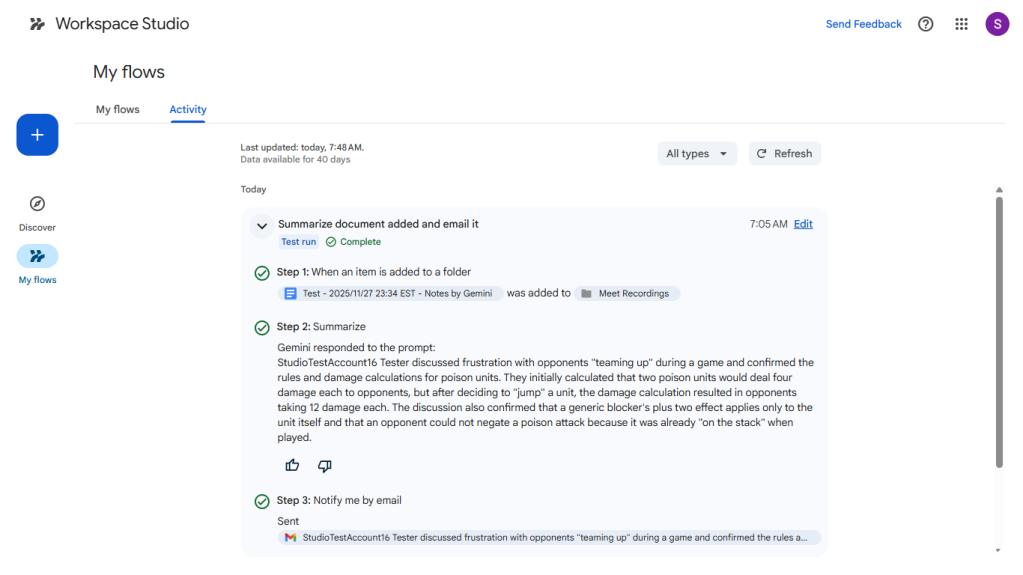
Reviewing the activity for a flow.
Howard Wen / Foundry
Clicking the Activity tab on the…


